When Migration Isn't Migration: Transforming Legacy Digital Humanities Sites
- Nick Steinwachs
- Jan 5
- 9 min read
Your digital humanities site is a decade old. It was cutting-edge when it launched—custom-built to showcase a unique collection with features no off-the-shelf platform could provide. Now the security warnings are piling up, the original developers are long gone, and every Rails upgrade feels like defusing a bomb.
You need to modernize. But here's what nobody tells you: for many legacy DH sites, "migration" is the wrong word entirely. What you actually need is a complete data transformation.
This post explains why pre-standard digital humanities systems can't simply be migrated, what transformation actually involves, and how to evaluate whether your institution's site faces this challenge.
Why can't you just migrate legacy digital humanities content and sites?
Many legacy digital humanities sites predate the standards that modern platforms depend on—making traditional migration impossible.
The International Image Interoperability Framework (IIIF) didn't reach broad adoption until the mid-2010s. If your site was built before then, it likely stores images, metadata, and presentation logic in completely bespoke structures. There are no manifests to export. There's no standards-compliant data to move.
Consider what "migration" normally means: you export data from System A in a standard format, then import it into System B. This works when both systems speak the same language—when your content exists as IIIF manifests, Dublin Core records, or other interoperable formats.
But bespoke DH sites often invented their own formats. The relationships between objects, the way annotations connect to images, the metadata schemas—all custom. All undocumented. All locked inside application code that hasn't been touched in years.
This isn't a criticism of how these sites were built. They were built before the standards existed. The challenge is that modernizing them requires reverse-engineering those custom structures and rebuilding them from scratch in modern formats.

What does transformation actually involve?
Transformation means extracting data from legacy structures, understanding its semantics, and generating entirely new standards-compliant representations.
A typical transformation project includes several distinct phases:
Discovery and reverse-engineering. Before you can transform anything, you need to understand what you have. This means digging through legacy codebases, database schemas, and file structures to map how the original system organized content. Documentation is usually incomplete or absent—the system is the documentation.
Data extraction and normalization. Once you understand the structure, you extract the raw content: images, metadata, transcriptions, relationships between objects. This data gets normalized into intermediate formats that can be validated and manipulated.
Standards-compliant generation. The normalized data becomes the source for generating modern, interoperable formats. For image-heavy collections, this typically means IIIF Presentation API 3.0 manifests—the standard that enables any compliant viewer to display your content.
Feature reconstruction. Here's where it gets complicated. Legacy DH sites often have specialized features that standard platforms don't support out of the box. Multiple transcription variants per document. Toggle between different editorial interpretations. Side-by-side manuscript and transcription views. These features need to be rebuilt using modern technical approaches—custom viewer plugins, annotation services, extended metadata schemas.
Platform integration. Finally, the transformed content integrates with your target platform. If you're moving to Spotlight, Blacklight, or similar systems, this means configuring the platform to handle your specific content types and ensuring the specialized features work correctly.
TL;DR - You're not moving data. You're creating new data that represents the same scholarly content in a completely different technical form.
How do security vulnerabilities create urgency?
Legacy DH sites accumulate security debt faster than general web applications—and the risks compound over time.
Custom Rails applications from 2012-2015 are running on framework versions that stopped receiving security patches years ago. The gems they depend on have known vulnerabilities. The authentication mechanisms predate modern security standards.
Most institutions apply emergency patches when critical vulnerabilities emerge, but this becomes increasingly difficult as the gap between the legacy codebase and current standards widens. Eventually, patching isn't feasible—the application architecture is too far removed from what modern security practices expect.
We've seen institutions where the security team has flagged a DH site for years, but the combination of specialized features and limited technical documentation made modernization seem impossible. The site limps along, increasingly vulnerable, until an incident forces action.
The uncomfortable truth: if your legacy DH site hasn't had a substantive architectural update in five or more years, it's likely carrying significant security risk. And the longer you wait, the more expensive transformation becomes—both because the technical gap widens and because you may need to respond to an incident rather than plan proactively.
If you're concerned about your current exposure, our migration services include security assessments as part of discovery engagements.
What features were hardest to preserve?
Specialized scholarly features—the capabilities that make a DH site valuable to researchers—require the most careful reconstruction.
Standard digital collection platforms handle standard use cases well: display an image, show some metadata, enable search. But scholarly DH sites often provide capabilities that generic platforms don't support. The specifics vary by project, but common patterns include:
Multiple annotation layers where a single image has several associated transcriptions, translations, or commentary tracks
Custom viewing modes that present content in ways standard viewers don't support
Specialized metadata relationships connecting objects across collections in domain-specific ways
Multi-institutional attribution where contributing repositories have different rights statements and metadata standards
These features aren't optional extras—they're why the DH site exists. A transformation project that loses them has failed, even if the technical migration succeeds.
The challenge is that you often don't fully understand what needs preserving until you're deep into the project. Legacy systems encode assumptions that were never documented. Scholarly workflows depend on affordances that seem minor until they're gone. This is why transformation projects require close collaboration with the people who actually use the system—not just IT stakeholders, but the scholars and curators who depend on it daily.
How long does transformation take?
Timeline depends heavily on collection complexity, but expect weeks of intensive work rather than days of configuration.
A transformation project for a moderately complex DH site—several thousand objects, multiple transcription variants, custom viewing features—typically requires:
Discovery phase: 1-2 weeks to reverse-engineer legacy structures and document transformation requirements
Development sprints: 3-4 weeks of intensive development for extraction pipelines, manifest generation, and feature reconstruction
Integration and testing: 1-2 weeks for platform integration, user acceptance testing, and refinement
This assumes a focused team with relevant expertise. The timeline extends significantly if the legacy codebase is particularly opaque, if feature requirements expand during discovery, or if institutional review processes require extended approval cycles.
What doesn't work: assuming you can "just migrate" and discovering mid-project that transformation is required. This is how projects blow budgets and timelines. Better to scope correctly from the start—our migration services begin with discovery engagements designed to surface these complexities before commitments are made.
How do you know if your site needs transformation?
Three questions determine whether you're facing a migration or a transformation.
Can you export IIIF manifests from your current system? If yes, you have standards-compliant data that can potentially move to another IIIF-aware platform. If no—if your images and metadata exist only in proprietary application structures—you need transformation.
Does your site predate 2015-2016? This is roughly when IIIF adoption accelerated in the cultural heritage sector. Sites built earlier were often designed before interoperability standards existed. They may be excellent scholarly resources, but they're almost certainly not standards-compliant.
Do you have features that standard platforms don't offer? Custom annotation interfaces, specialized viewing modes, multi-variant transcription display—these features suggest bespoke development that won't transfer automatically. Preserving them requires reconstruction, not migration.
If you answered "no," "yes," and "yes" to these questions, you're looking at a transformation project.
What does successful transformation look like?
The goal is a sustainable, maintainable platform that preserves everything scholars depend on while eliminating technical debt.
A well-executed transformation delivers:
Standards compliance. Your content exists as IIIF manifests that any compliant viewer or application can consume. You're no longer locked into a single custom implementation.
Sustainable architecture. The platform runs on actively maintained software with clear upgrade paths. Security patches apply cleanly. New features can be added without archaeological expeditions through legacy code.
Feature preservation. Scholars can still do everything they could before—and often more, because standards-based infrastructure enables capabilities the legacy system couldn't support.
Institutional knowledge. Documentation exists. The team that built the new system transferred knowledge to your staff. You're not dependent on a single vendor or developer who might disappear.
Extensibility. The patterns used for your transformation—custom viewer plugins, annotation services, metadata extensions—can apply to other collections. You've built infrastructure, not just migrated content.
Mini Case Study: The Emily Dickinson Archive
Harvard's Emily Dickinson Archive demonstrates how close collaboration with scholarly stakeholders enables successful feature preservation in complex transformations.
Note: As of writing this, the latest Spotlight EDA collection is not yet available. We will update this once it is with a link.
The Emily Dickinson Archive (EDA) presented exactly the challenges this post describes: a decade-old bespoke Rails application, built before IIIF existed, with specialized scholarly features that no standard platform could replicate. Harvard's Library Technology Services needed to move this high-profile resource to sustainable infrastructure—their CURIOSity platform (a Spotlight implementation)—without losing what made it valuable to Dickinson scholars worldwide.
The features that made this hard
Three capabilities defined the EDA's scholarly value, and none of them had obvious solutions in standard digital collection platforms:
A century of editorial transcriptions. Emily Dickinson's manuscripts are notoriously difficult to read—her handwriting is idiosyncratic, her punctuation unconventional, her line breaks ambiguous. Since the 1890s, multiple editors have produced transcriptions reflecting different scholarly interpretations. The Johnson edition (1955) made different choices than the Franklin edition (1998), which made different choices than scholars working from new manuscript discoveries.
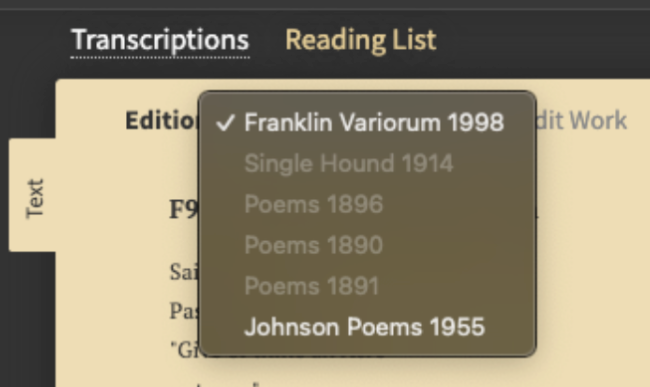
The original EDA displayed up to five transcription variants for a single poem. Scholars needed to compare them—not abstractly, but side-by-side with the manuscript image. Standard annotation models assume one authoritative transcription per image. The EDA needed many, each preserving its editorial provenance.
Physical versus metrical line breaks. Here's something non-specialists wouldn't know: the line breaks in Dickinson's manuscripts aren't the same as the line breaks in her poems. She wrote on small pieces of paper. When she ran out of room, she continued on the next line—a physical constraint, not a poetic choice. Editors later determined where the metrical line breaks should fall based on interpretation of rhythm and meaning.


Serious Dickinson scholarship requires toggling between these views: the poem as she physically wrote it versus the poem as editors interpret it. This isn't a standard viewer feature. It had to be reconstructed.
Formatted transcriptions with editorial apparatus. The transcriptions weren't plain text. They included strikethroughs where Dickinson crossed out words, insertions she added above the line, uncertain readings marked with editorial conventions. The original system stored this formatting in custom structures that had to be preserved through transformation and rendered correctly in the new viewer.

How dual-track agile made it work
We couldn't have preserved these features without continuous collaboration with the people who understood them. The project used dual-track agile methodology—running discovery and delivery in parallel, with scholars and curators directly involved throughout.
Weekly sprint planning with stakeholders. Harvard's curatorial staff joined sprint planning sessions. They weren't just reviewing finished work—they were helping prioritize what mattered most. When we discovered that generating manifests with all transcriptions embedded created unwieldy 16MB files, they helped us understand which viewing patterns were essential and which were nice-to-have.
Continuous user testing. Each sprint ended with demos to the scholarly stakeholders. The curator responsible for the collection tested actual research workflows against in-progress builds. This caught issues that technical review alone would miss—like ensuring the toggle between physical and metrical line breaks felt natural to someone doing real scholarship.
Bridging technical and curatorial vocabularies. Previous conversations between technical and curatorial teams had created tension—they were discussing requirements in different vocabularies. Our role included translation: helping technical constraints become understandable to curators, and helping scholarly requirements become implementable by developers.
The outcome
In four one-week sprints, we transformed approximately 4,800 works into IIIF Presentation API 3.0 compliant manifests.

We developed a custom Mirador plugin that displays multiple transcription variants with toggle controls for line break interpretation. We extended Harvard's Media Presentation Service to support the annotation patterns the EDA required—infrastructure that's now available for other Harvard collections with similar needs.
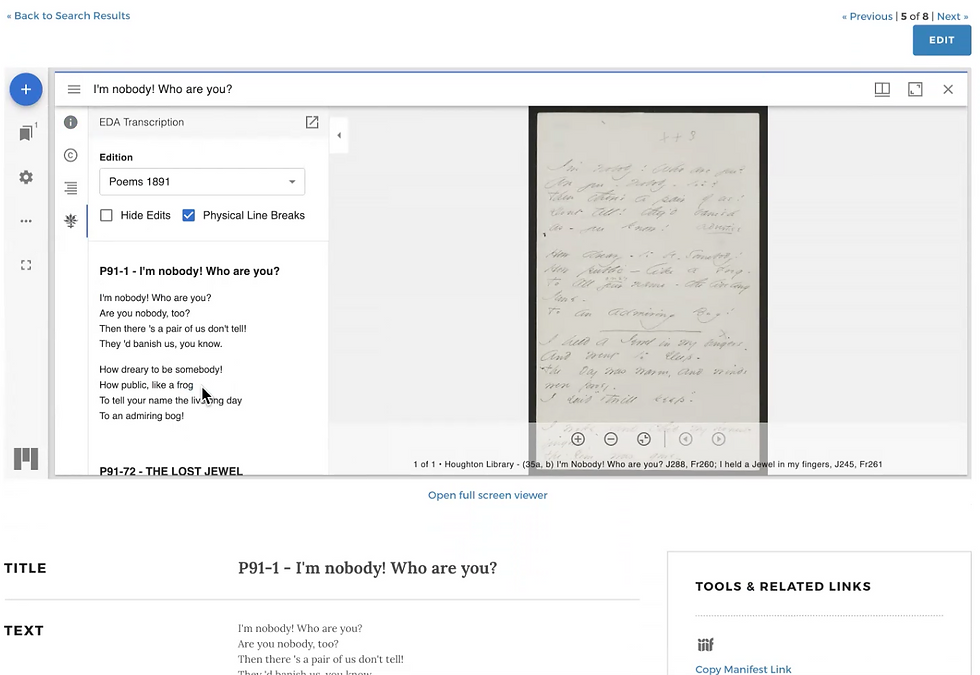
The specialized features Dickinson scholars depended on? Preserved. The security vulnerabilities that had flagged the original site for years? Eliminated. And because we built on IIIF standards and Spotlight infrastructure, the upgrade path is clear for years to come.
More importantly: the patterns we developed—for handling multiple annotation layers, for preserving formatted transcriptions, for extending standard viewers with custom plugins—are reusable. The next institution facing a similar transformation doesn't have to start from scratch.
FAQ
How much does a transformation project cost? Costs vary significantly based on collection size, feature complexity, and institutional requirements. A focused transformation of a moderately complex DH site typically requires 4-8 weeks of development effort. We recommend a scoping engagement to assess your specific situation before committing to estimates.
Can we do this work in-house? Possibly, if your team has experience with IIIF, the target platform (Spotlight, Blacklight, etc.), and complex data transformation. The challenge is usually the reverse-engineering of legacy systems—it requires both technical skill and experience recognizing patterns in undocumented code.
What happens to our existing URLs? URL preservation and redirect strategies are part of transformation planning. Scholarly citations to your current site shouldn't break. This requires coordination between the transformation work and your infrastructure team.
Do we have to use Spotlight or Blacklight? No—IIIF-compliant content can work with any standards-based platform. However, Spotlight and Blacklight are well-suited for curated digital collections and have active open-source communities. We recommend them for most academic use cases.
How do we maintain the transformed site long-term? Because the new platform uses standard technologies and community-supported software, ongoing maintenance is straightforward. Your library IT team can handle routine updates. Feature enhancements can be contributed back to open-source communities, further reducing long-term maintenance burden.
