.png)
Custom Visual Structure Editor for IIIF Ranges

Hello and welcome. In this article I will illustrate the architecture and design of a custom visual range editor built for one of our clients and will show you how to enable this code in your own project. I’d like to thank my amazing colleagues for their contributions to this project: JP Engstrom, Senior Software Engineer at Notch8 and Martin Lovell, Software Engineer 4 at Yale University Libraries. Without their help this project would not be as complete. First I’ll walk you through the set up and underlying models. Then I’ll explain the standalone editor app. Finally, I will explain how to put the pieces together and share lessons learned. Now hang on because we are about to get pretty deep into the code but don’t worry, I’m here to help you through it.
The project came about because our archivists needed a way to take advantage of the newly released functionality of IIIF structures and ranges. Rather than manually edit manifest json files, which would be slow and error prone, we set about creating a scalable solution. We began this project a little more than 4 years ago and since then have had to make very few changes to the original implementation. I’ll get to those lessons learned at the end of the article.
Why did we want to use IIIF structures? Because custom structure ranges enable story tellers to craft a myriad of new ways to investigate and interact with collection materials and can provide users a new way to discover the objects in your archives. The current solution was to use text editing software to manually create ranges and as one can imagine this was prone to errors for the very specific IIIF syntax and provided no way for the metadata archivists to see which canvases were becoming part of which structure. With this we set about creating a solution.
Our implementation was designed to serve metadata archivists and to do so we created a visually based system where they could intuitively interact and build whatever they needed to. We intentionally built the system with as little code and helper text as possible to create a clean and future proofed solution that would be fun and easy for the archivists to use. We based operation on editing files in a way that was familiar to the archivists and backend system users to provide an easy on ramp to using the new tool. A few months ago, I had the opportunity to talk with some metadata archivists that actively use the visual structure editor. There I learned that they needed to do a little exploring to sort out the functionality but ultimately the tool works extremely well for them. Perhaps this is why the tool has needed so little rework in the 4 years it has been in use.
There are three parts that intertwine to create and display the visual structure editor and the custom ranges - models in the backend application, rendering in Universal Viewer in the frontend application, and a standalone React application. First I’ll walk through the implementation in the backend application. We wanted to highly control the data being saved to the structure section of the IIIF manifest so we began with our database and created a structures table with all relevant attributes.

In our client’s current implementation we manually create a IIIF manifest based on the metadata from what we call our Parent Objects. This is the main identifier for a single record in our client’s system. From this metadata we compose IIIF manifests that are then represented on the frontend through Universal Viewer. Because we already had the setup to create our manifests we simply needed to add in a section for the structures or so we thought. It ended up being a tad more complicated than just adding a method to our existing manifest creation model. We did need to add the structure to our IIIF manifest which we did by adding this code to our IIIF version 3 manifest builder:


In addition to adding structures to the IIIF manifest we needed to control how this information was being created, edited, and saved so we added a Range Controller.

This gave us the capability to manage user permissions, add notifications for system backend users, and control how the ranges were saved. We realized we needed even more control over how the ranges were built and also created an IiifRangeBuilder so we could take advantage of Rails model validations and compose IIIF specific syntax that could easily be read by any IIIF viewer.

The IiifRangeBuilder allowed us to take the information provided by metadata archivists and turn it into the not uncomplicated format expected for the structure section in IIIF manifests. We were able insert all expected labels while also taking advantage of additional models we created to break up the logic and needs for both canvases and ranges.


With these models we were able to compartmentalize the different needs for each object inside the structure format. Because we were using Rails models we were also able to utilize database relationships to set up appropriate ties between objects.
Once all relationships were aligned and the logic created a readable IIIF manifest we were able to see the changes in the frontend. Our client’s implementation uses Universal Viewer to display IIIF manifests but the structures created follow IIIF standard syntax and are renderable in any compliant IIIF viewer.

Now that the logic was formed and we knew we could render structures in IIIF compliant format we set about building the tool that would enable the metadata archivists to have a visual display of the structures they were creating. Because we knew we wanted the tool to be highly visual and interactive we diverted from how views were traditionally built and built a stand alone React application that would serve as the editing tool.

Our goal in writing this React tool was to code as minimal as possible to make it as easy as possible for us to understand later. It was an attempt to future proof our work by making it simple to read that has proved effective in the long run. Over the course of this tool being in action we have only needed to go back once in four years to make any changes. Overall, the tool continues to serve archivists well and on a recent campus visit these backend system users praised the ease of operation this tool provides for them in creating custom structures and ranges for IIIF manifests.


Metadata archivists are able to launch the structure editor tool from the Parent Object edit page in the backend management application. Once the IIIF manifest is loaded they are able to create an infinite variety of nested structures and are able to visually maneuver where each canvas is associated. The ranges are all customizable by title, size, and interior structure. A canvas may be associated with as many ranges as the user wishes. The visual structure editor provides a solution for creating custom structures that is visually clean as well as easy for users to understand and use.
Now you may be wondering how do these pieces all fit together. That’s the next explanation.
Our client’s backend management application is a Rails application and so to serve up a React app inside of it, we needed a little orchestration. We do this through a script in our package.json and give it it's own url.

Then to launch the tool we do so through traditional Rails routes and a button action.


You’ll notice a token being passed. We needed a way to authenticate our users so we used jwt encoding to create user tokens that the React app would expect. We enabled this through a couple of methods.

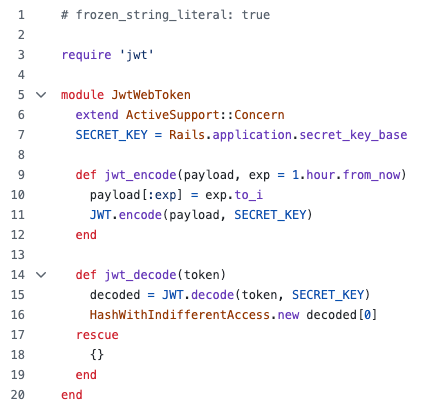
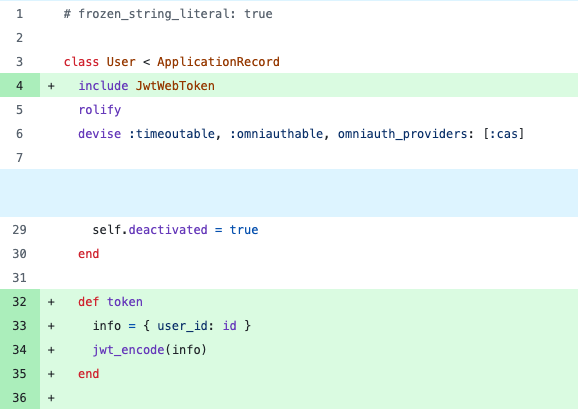
With those connection points we were able to launch the standalone React app in the backend management system, use that database, and tie into all necessary model validations. The React app passes information on ranges created through the routes and via the Range Controller which manages communication between the two applications.
For a long time we needed to do nothing with the visual structure editor…until one day about 7 months ago, it started producing duplicate ranges. Not for all objects, just some, and few and far between with no similar features as anyone could determine. Yep, no rhyme or reason we could find could determine why all of a sudden it was behaving differently. Ultimately, we never found the underlying cause of the change in behavior. But we did stop it from continuing. By adding a unique constraint on the database layer we were able to stop this behavior from persisting. Of course, we had to deal with the joy that is adding a unique constraint after a database schema has existed for a long time but once that pain point was tackled we were able to get back to seamless creation of custom IIIF structures. Lesson learned - add unique indexes early on.
With this you have all the parts and pieces that went into building the custom visual structure editor. This code is open source so you can peruse at your convenience and sample whatever suits you. If you have any questions on how to implement this yourself please feel welcome to reach out to me via email at kait@notch8.com. Wishing you luck in creating new journeys through your collections!
